DesignerTies™ Patient Guide

PATIENT HYGIENE PROTOCOL

Keep Your DesignerTies™ — and Your Smile — Clean!

Your simple daily guide to keeping your braces, DesignerTies™, and smile clean between orthodontic appointments.

important

Leave Your DesignerTies™ in Place

DesignerTies™ are orthodontic ligatures and should remain in place unless removed or changed by the orthodontic professional. Clean around the DesignerTies™ rather than attempting to remove, pull, twist, or reposition it.


01
Step 01

DesignerTies™: What Patients Need to Know

DesignerTies™ attach to the orthodontic bracket and include connectors at the 12-o’clock and 6-o’clock positions. These additional areas should receive particular attention during daily cleaning because food and plaque can collect. 

Remember:

The goal is not to clean the DesignerTies™ as a separate object. The goal is to remove plaque and food from the surfaces surrounding it.

02
Step 02

Daily DesignerTies™ Cleaning Routine

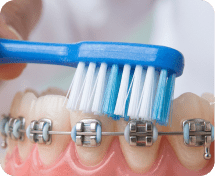
Brush with fluoride toothpaste at least twice each day. Brushing after meals is preferred when practical. Use a soft-bristled toothbrush or powered toothbrush.

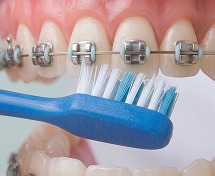
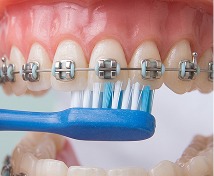
Brush in three directions:

A

Above the Bracket

Angle the brush toward the area between the bracket/DesignerTie and the gumline.

B

Above the Bracket

Use gentle, short strokes to clean around the tie without pulling on it. 

C

Above the Bracket

Angle the brush toward the area between the bracket/DesignerTie and the biting edge of the tooth.

Remember:

Don’t forget the gumline. Plaque remaining along the gumline can contribute to gingival inflammation

03
Step 03

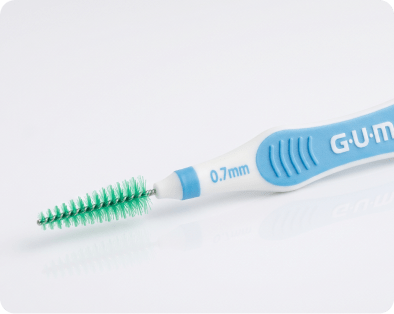
Use an Interdental Brush

The interdental brush is the key additional cleaning tool for DesignerTies™. Use it once or more each day to clean areas the toothbrush cannot easily reach.

Place the interdental brush:

Use gentle back-and-forth movements.

Important:

The brush should fit comfortably. Do not force a brush into a tight space.

The purpose is to remove plaque and food—not to push against or deform the DesignerTies™

04
Step 04

Pay Special Attention to the Two DesignerTies™ Connectors

12-O'CLOCK CONNECTOR

After brushing, place the interdental brush around the area immediately above the bracket/archwire.

Gently clean around the connector from the accessible side. 

6-O'CLOCK CONNECTOR

Repeat the same process below the bracket.

These two areas should be treated as specific cleaning targets during every interdental-brush session

Remember:

Don’t scrub harder. Clean more precisely.

05
Step 05

Clean Between Your Teeth

Clean between your teeth at least once each day. Use floss, a floss threader, interdental brush, or another interdental cleaning method recommended by your orthodontic/dental professional. 

Remember:

Cleaning around the DesignerTies does not replace cleaning between the teeth.

06
Step 06

After Eating

Food can become trapped around brackets, wires, and DesignerTies™. Whenever possible:

Rinse

Rinse with water after eating.

Check

Remove visible food particles.

Brush

Brush when practical

Clean

Use your interdental brush during your regular daily cleaning.

Remember:

If brushing is not possible immediately, rinsing thoroughly with water is better than leaving food around the appliance. 

07
Step 07

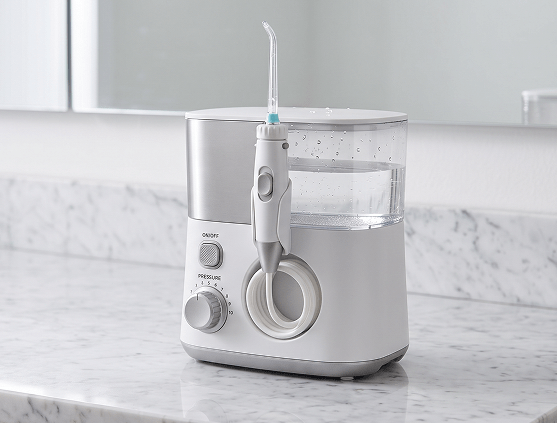
Optional Water Irrigator

A water irrigator may be used as an additional cleaning aid. It can be helpful for flushing food particles from around brackets, wires, and DesignerTies™.

Remember:

Water irrigation should supplement—not replace—brushing and mechanical plaque removal.

08
Step 08

What Not To Do

Pull on the DesignerTies™.
Force an interdental brush into a tight space.
Twist or reposition the DesignerTies™.
Use excessive pressure when cleaning around the connectors.
Attempt to remove the DesignerTies™.
Assume that rinsing alone is sufficient.
Scrape the DesignerTies™ with a sharp object.
Remember:

If your DesignerTies™ become loose, break, or change position, contact the orthodontic office

09
Step 09

Recommended Daily Routine

Morning

After Meals

Evening

10
Step 10

Chairside Instruction for Orthodontic Team

When DesignerTies™ are placed, the clinician or orthodontic assistant should demonstrate the cleaning technique using a mirror.

Show the patient the DesignerTies™. Explain that it has two additional connector areas that should receive attention during cleaning.
Demonstrate normal brushing. Show the patient how to clean above, directly around, and below the bracket.
Demonstrate the interdental brush. Show the patient how to approach the spaces around the archwire and bracket.
Demonstrate the two DesignerTies™ targets. Have the patient personally clean the 12-o'clock connector and the 6-o'clock connector.
Have the patient demonstrate the technique back to the clinician. Correct technique is more important than simply giving the patient an oral-hygiene product.
Reinforce at subsequent appointments. At each visit, inspect the areas around the DesignerTies™ and reinforce technique if plaque accumulation is present.
11
Step 11

Keep Your DesignerTies™ Clean

Your DesignerTies™ stay on your braces until your orthodontic professional changes or removes them. You don’t need to remove or clean the ties separately. Instead, clean carefully around them every day.

01 Brush

Brush above, around, and below your brackets.

02 Clean Between

Use your interdental brush around the wire, bracket, and both DesignerTies™ connectors.

03 Check

Look for trapped food and make sure your DesignerTies™ are still in place. 

Remember:

Clean around the 12-o’clock and 6-o’clock connector areas every day. If your DesignerTies™ become loose, break, or move, contact your orthodontic office. 

12
Step 12

Clinical Rationale

DesignerTies™ should be considered within the broader oral-hygiene requirements of fixed orthodontic appliances. Fixed appliances create additional plaque-retentive surfaces and make mechanical plaque removal more challenging.

Evidence comparing ligation systems suggests that elastomeric ligatures may harbor greater bacterial loads than stainless-steel ligatures, but current evidence is low quality and has not established that this necessarily translates into clinically important differences in periodontal health.

This protocol should address the additional geometry of the DesignerTies™ by directing patients to mechanically clean the areas surrounding the two connectors. 

13
Step 13

Recommended Clinical Standard

For initial clinical implementation, the recommended DesignerTies™ hygiene standard is:

Water rinsing and water irrigation may be used as adjuncts.

The protocol should be reinforced at each orthodontic appointment and individualized according to the patient’s plaque accumulation, gingival condition, dexterity, appliance configuration, and clinician recommendations.

DesignerTies™ should be replaced at each orthodontic adjustment appointment, and in all cases no later than 6 weeks after placement. DesignerTies™ are intended for use in patients who demonstrate acceptable oral hygiene. Use should be deferred or discontinued in patients who are unable to maintain adequate oral hygiene, until satisfactory plaque control has been established.